
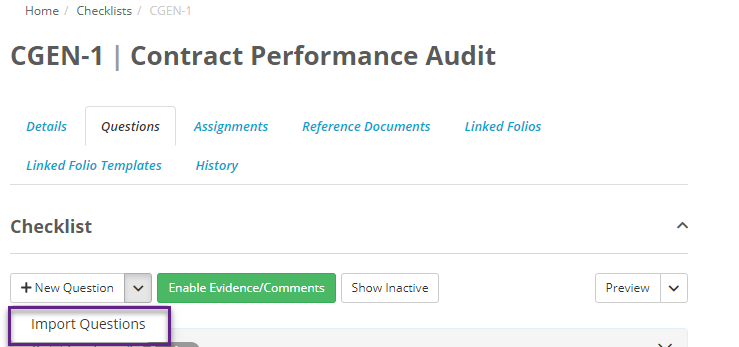
Once you have created a Checklist , click on the Questions tab. Select Import Questions.
A window will then appear prompting you to download the Checklist import template. Click on the download.
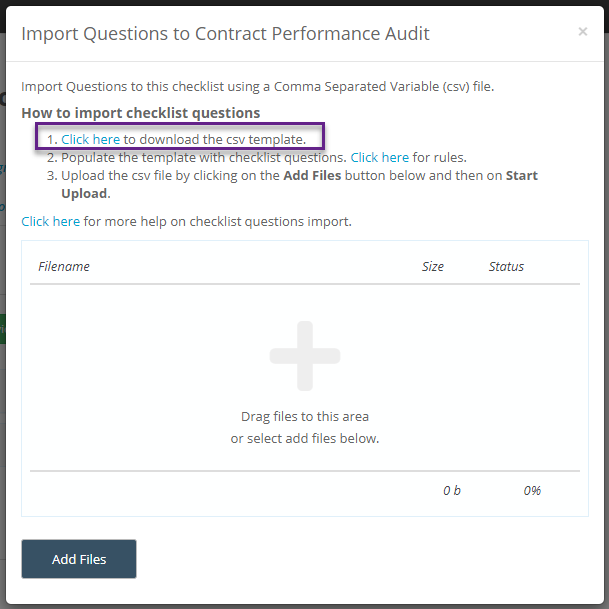

To view the data rules for Checklist question import click here. Once you have completed entering the questions into the worksheet, open Folio back to the pop-up screen
Select Add Files, selecting the filled out template.
Folio will then scan the template ensuring that all the information that has been entered is correct. Depending on how many questions you are importing this may take some time.
Once Folio has checked all the questions is will take you to a review screen, allowing you to review all of the questions and edit any of the fields if need be. If all the information is correct click import, if not then you can abort the import and start again.
If Folio finds any issues with the information in the template then the fields will be highlighted red and have a description of what went wrong.
You then can either fix the issues on this screen, or export only the errors back to a file, allowing you to fix them in excel. Clicking import here will import only the fields that is correct, the fields with issues will not be imported into Folio.
Importing pre-existing questions into Folio using checklist question import
If a question already exists in the question library inside of Folio then importing them is simple. As long as the question name is identical to the one already in the question library, then all other fields can be left blank, alternatively if all fields for the question are the same as the one in the library already then Folio will use that already existing question.
If the name is the same as one in the library but any of the settings for the question are different to the one in the library then Folio will have an error, and prevent you from importing the same question twice. If this does occur then you can either change the name to the question or change the fields to match that of the field already in the question library