
Checklist Workflow
Checklist workflow allows you to add multiple review stages. This feature is ideal to send checklists to Service Providers/ Sub-contractors or Suppliers. Once they complete the checklist, it can go through several internal review stages. A typical setup of a checklist with review stages is given below:
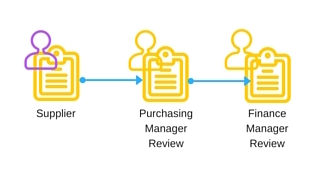
Folio also provides crisp traffic lights and dashboards that will show you at what stage a checklist is at any point in time.

Here are some useful articles on checklist workflow:
What are checklist review stages?
How do I set up checklist review stages?
How does a Reviewer complete a checklist review?
Bulk Assignment of Actions and Checklists
Folio enables you to assign actions and checklists in bulk to multiple users at one go.
The bulk assignment feature comes with an 'Abort & Rollback' button that enables you to stop the bulk assignment midway and roll back created records.
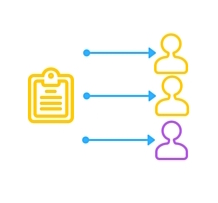
Click here for more information on how to bulk assign actions and checklists.

Lite Users
Need to send Checklists or Actions to Entities in Folio? The new Lite User functionality allows you to do this seamlessly. User details can be managed in one place and cost effective pricing enables you to purchase Lite Users in packs of 100 or 200 Lite Users or as part of an Enterprise Folio User License.
Here are some useful help articles on Lite Users:
Action and Checklist Assignment improvements
Action and checklist assignment settings are now easier to access as they appear on the quick assignment pop-up itself. If you want to change the escalation or notification frequencies you can do this easily.

Completing a checklist now easier
The user no longer has to click the blue 'Answer Questions' button to complete a checklist. Click on the checklist in your To Do List and you are take straight to the checklist you need to complete.

Overdue Checklists Snapshot
We have now introduced an overdue checklists snapshot that displays an ageing analysis of overdue checklists

New Checklist Mouseover Statuses
Mouseover the checklist status traffic lights to see a new detailed status popover.

Action Results Evidence
Actions Results Evidence can now be added as a column to the Action Results Report.
Wrapping of long hyperlinks on reports and on search screens
Long hyperlinks will now wrap both on reports and on search screens for better space management.