
A user with Checklist Assignment Update rights (including Super Users) are able to update the due date of a checklist to a future date. If the checklist is not repeated, then the new due date just needs to be set after the current date.
If the checklist is repeated a user can still change the due date of an individual repeat, but there are a few more rules that apply:
- The due date of an earlier repeat can be set past a later repeat, i.e the due date of repeat 2 can be later than the due date of repeat 3, but the sequence of the repeats will remain the same.
- Multiple repeats of the same assignment cannot have the same due date.
Note: Due date adjustments can be made regardless of the checklists status, i.e Not Started, In Progress, Completed etc.
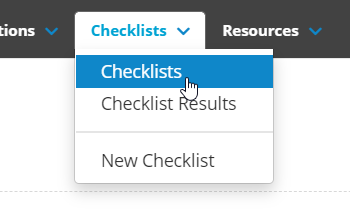
To change a checklists due date, first navigate to the assignment screen of the checklist that you want to change. You can do this by clicking on Checklists at the top of the screen:
Then on the Checklists list screen, click on the ellipsis to the right of the checklist that you want and select View Assignment:

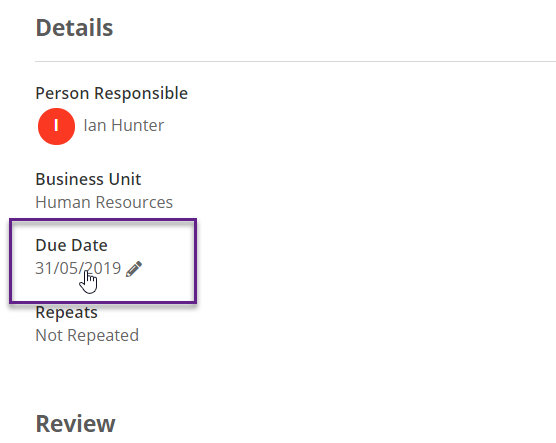
Then on the Details tab for that assignment, for non repeating checklists you can change the due date by clicking on the date under Due Date. and changing it to the new due date:
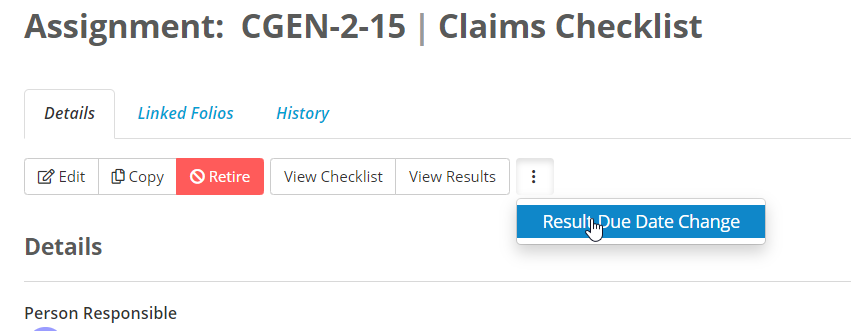
For repeating checklists, you will need to click on the ellipsis next to View Results and select Result Due Date Change:
You will then need to select the repeat that needs updating, the new due date and provide a reason for the change:

Then select Change Due Date.